How to Buy USDT on Bybit P2P in India (UPI, IMPS, PhonePe)
Bybit P2P works like Binance P2P: Bybit holds the seller’s USDT in escrow, you pay the seller in rupees, the seller confirms, and the USDT is released to you. Bybit is registered with India’s Financial Intelligence Unit (FIU-IND) and is the main alternative to Binance for Indian users since OKX left India in 2024. Its standout feature is how much it tells you about each advertiser, especially how fast they usually release after you pay.
Which exchange is cheaper changes during the day. Check the live board or the Bybit P2P page before you order.
Before you start
- Complete identity verification in the Bybit app with your Aadhaar or passport (and PAN where asked) plus a face scan.
- Turn on 2FA and the security settings Bybit recommends.
- Add a payment method in your own name: UPI ID, bank account for IMPS, PhonePe, Paytm, Google Pay or Digital Rupee. The name must match your Bybit verification.
- Check your UPI limit. Most banks cap UPI at about ₹1 lakh a day, less on a newly set-up phone. Use IMPS for larger amounts.
Step 1: Open P2P and filter
In the Bybit app, open P2P Trading from the home screen or Buy crypto. Choose Buy, USDT and INR.
- Enter the amount you want to spend so only offers that accept it remain.
- Filter by payment method. Bybit’s INR market includes UPI, IMPS, bank transfer, PhonePe, Paytm, Google Pay and Digital Rupee. coinglee shows Bybit’s price for each method.
- Turn on verified advertisers only for larger amounts.
Step 2: Read the advertiser stats
Tap an advertiser’s name to open their profile.
| Stat | Why it matters | Good sign |
|---|---|---|
| Orders (30 days) | How active they are now | 50+ (coinglee’s threshold) |
| Completion rate (30 days) | How often their orders finish | 95% or higher |
| Average release time | How long you’ll wait after paying | Under a few minutes |
| Average payment time | How fast their buyers pay | Not important when you’re buying |
| Verified advertiser badge | Extra checks and a deposit | Good, but not enough alone |
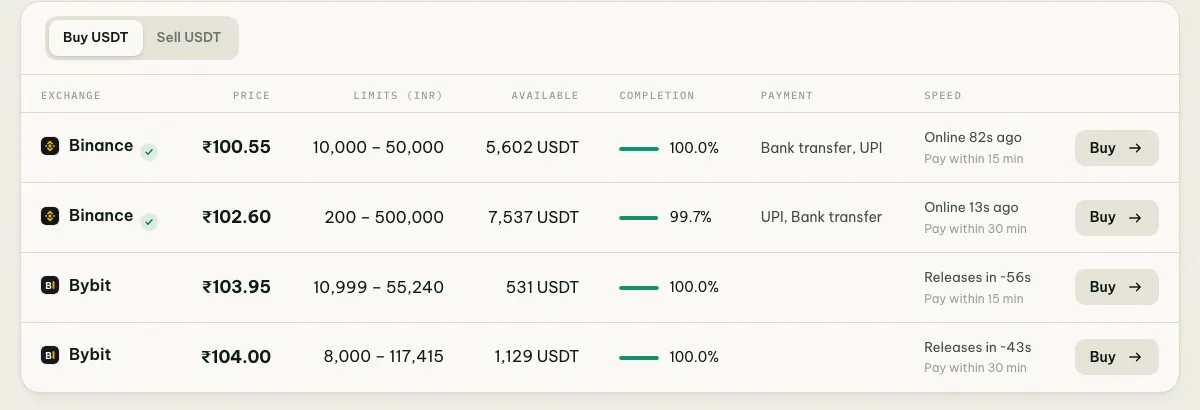
Because Bybit publishes release times, the Speed column in coinglee’s offers table shows them for Bybit offers.
Step 3: Place the order and pay
- Open the offer, check the price, limits and payment window (15 or 30 minutes), enter the amount and tap Buy.
- Read the advertiser’s terms: remark instructions, accepted banks, any extra verification.
- Pay the exact amount to the exact UPI ID or account in the order, from your own account. Check that the payee name your UPI app shows matches the order before entering your PIN.
- Save the UTR and tap Payment completed, only after the money has left your account.
Step 4: Receive the USDT
When the advertiser confirms, the USDT arrives in your Funding account. Move it to the Unified Trading account to trade, or withdraw it. See which USDT network to use.
Fees, TDS and costs
Bybit doesn’t currently charge a fee to take an existing P2P offer. India’s 30% tax on crypto gains and 1% TDS on transfers still apply; check the order details for any TDS line and keep your records. See 1% TDS and 30% tax on crypto. Wallet methods such as PhonePe or Paytm are often a little dearer than UPI or bank transfer; compare on the payment method pages.
If the seller doesn’t release
- Share the UTR in the order chat.
- Wait until the payment window ends.
- Tap Appeal, choose the reason and upload the payment proof.
- Keep your phone nearby for follow-up questions from support.
Never cancel after paying. That returns the USDT to the seller.
Bybit compared with Binance
| Binance P2P | Bybit P2P | |
|---|---|---|
| FIU-IND registered | Yes | Yes |
| UPI, IMPS, bank transfer | Yes | Yes |
| PhonePe, Paytm, Google Pay, e₹ | Yes | Yes |
| Release time shown | Seller’s last online time | Average release and payment time |
| USDT arrives in | Funding wallet | Funding account |
Full comparison: Binance vs Bybit P2P in India.
Common questions
Why isn’t OKX an option? OKX stopped serving Indian users in 2024. See is crypto legal in India.
Is a verified advertiser always safe? No badge replaces your own checks: stay in the order, pay from your own account, never approve a collect request, and never mark paid before paying.
Read also how to trade P2P safely in India.