How to Register a Binance Account in India (Aadhaar and PAN KYC, Referral Code, 2FA)
Opening a Binance account in India takes about 10 minutes. Identity verification asks for Aadhaar or a passport, your PAN and a face check, and Binance says most reviews finish within 48 hours. Binance is registered with FIU-IND, which is why the checks are stricter than a few years ago. Two choices can’t be changed later: the referral code, which can only be added while you register, and the account type (personal or entity).
What you need
| Details | |
|---|---|
| Age | 18 or older |
| Email or phone | An email you’ll keep, or your own +91 mobile number |
| Identity | Aadhaar or a passport, valid and in your name |
| PAN | Your PAN; Binance collects it as part of Indian KYC |
| Phone with a camera | For the face check |
| Bank account or UPI ID in your name | For paying on P2P: bank transfer/IMPS, UPI, PhonePe, Paytm, Google Pay or Digital Rupee |
The name on your Aadhaar or passport, PAN, Binance account and bank or UPI must all match, or P2P sellers will refuse your payment.
Step 1: Open the sign-up page
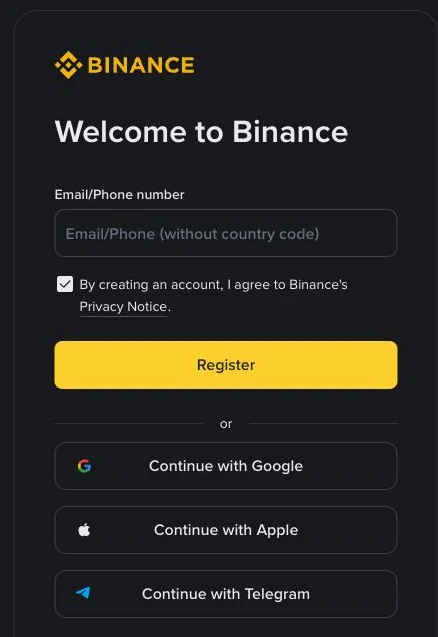
Go to binance.com and tap Sign Up, or install the Binance app from Google Play or the App Store. Check the address bar before typing anything. Fake exchange sites and “support” accounts on Telegram are a common way Indian users lose passwords and KYC photos. Never install an APK someone sends you.
Step 2: Sign up with email or phone
Enter your email or mobile number. The field says without country code: with +91 selected, type your 10-digit number only. Adding +91 or 0 again is the usual reason an OTP doesn’t arrive.
Signing up with Google, Apple or Telegram also works; that account then protects your Binance account, so secure it as well.
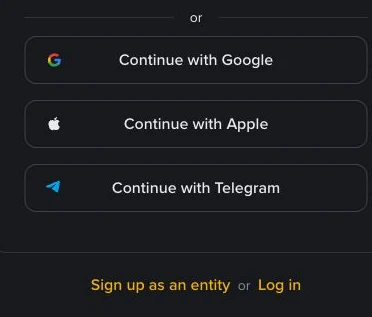
Don’t tap “Sign up as an entity” unless you’re registering a company. The account type can’t be changed later.
Step 3: Enter the code and set a password
Binance sends a 6-digit code; enter it within 30 minutes. If it’s missing, check spam or SMS filters, check what you typed, and wait for the countdown before resending.
The password needs at least 8 characters, one uppercase letter and one number. Don’t reuse your email or banking password, and don’t use your date of birth or PAN.
Step 4: Add the referral code before finishing
The referral code is entered during registration, and once linked it can’t be added or changed. If you sign up through a referral link, including the button at the end of this guide, check the code is filled in before confirming. It doesn’t change the P2P price you pay.
Step 5: Complete KYC
A new account is Withdraw Only until it’s verified. Start from Account → Identification or Get Verified on the home screen.
- Residence: India.
- Document issuing country: India.
- Document type: choose the option for your Aadhaar or passport from the list shown.
- Upload both sides of the original document: all corners visible, no glare, no photocopy or screenshot.
- PAN: Binance’s April 2025 notice for Indian users says Indian KYC includes collecting PAN details, and that existing users may be asked to re-verify. Enter it exactly as on the card.
- Face check: centred, good light, no cap, glasses or filters.
- Confirm your details. Once confirmed, your name and date of birth can’t be edited.
Why KYC fails, and how to fix it
| Cause | Fix |
|---|---|
| Blurry photo, glare, cut-off corners | Retake in daylight on a plain dark surface |
| Name differs between Aadhaar, PAN and the form | Use the spelling on your documents; if Aadhaar and PAN differ, update one of them first |
| Wrong document type selected | Start again and pick the type that matches the document you upload |
| Face check failed | Remove glasses or cap, face the light, use the app |
| Identity already used | One person, one account. Recover the old account via Binance support |
| Asked to re-verify | Common after the 2025 change; complete it before your next trade |
Never pay for a “verified account” or use a family member’s documents. Those accounts get frozen, often with funds inside.
Step 6: Turn on the security P2P requires
Binance P2P also requires SMS verification and at least one 2FA method: email, an authenticator app (Binance or Google Authenticator) or a security key. Set them up under Account → Security:
- Authenticator app. Keep the backup key offline; never share or screenshot it.
- Anti-phishing code, which appears in genuine Binance emails.
- Withdrawal whitelist (optional), so USDT only goes to addresses you’ve saved.
Step 7: Add a payment method in your own name
In P2P → Payment methods, add the accounts you’ll pay from: bank transfer/IMPS, UPI, PhonePe, Paytm, Google Pay or Digital Rupee. The holder name must match your verified Binance name exactly.
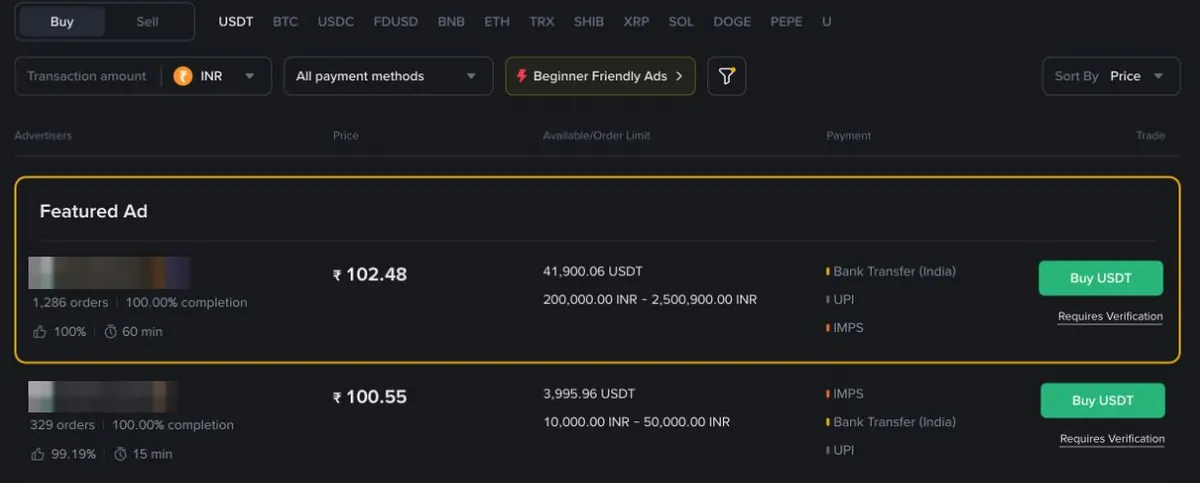
Prices differ by payment method, sometimes by ₹1–2 per USDT:

Tax: what to know before your first trade
India taxes crypto gains at 30% plus cess and applies 1% TDS on transfers above yearly thresholds. On P2P the buyer is responsible for deducting TDS when paying the seller; some platforms handle this inside the order. Keep your order history. See 1% TDS and 30% tax on crypto and the crypto tax calculator. This is general information, not tax advice.
Common questions
Can I add a referral code later? No. It can only be added during registration.
Is PAN mandatory? Binance collects PAN as part of Indian KYC. If your KYC screen asks for it, you can’t finish without it.
Is Binance legal in India? Using crypto is legal; Binance is registered with FIU-IND. See is crypto legal in India.
Can I use OKX instead? OKX stopped serving India in 2024. Bybit is the other FIU-registered option coinglee tracks.
After your account is ready
Compare today’s USDT rate in India, then follow how to buy USDT on Binance P2P. Read P2P safety in India before your first order.
Steps checked against Binance’s help pages on registration and identity verification on 4 October 2026. Screens can change; follow what your app shows.
How to open a Binance P2P account
Referral link: coinglee may earn a commission from the exchange. Your price doesn't change.
Crypto products and NFTs are unregulated and can be highly risky. There may be no regulatory recourse for any loss from such transactions.