How to Buy USDT on Bybit P2P in Pakistan (Easypaisa, JazzCash, Bank)
Bybit P2P works like the other big P2P markets: Bybit holds the seller’s USDT in escrow, you pay the seller in rupees, the seller confirms the money arrived, and the USDT is released to you. Two things make Bybit worth knowing in Pakistan: it accepts JazzCash, which Binance doesn’t for PKR, and it tells you how fast each advertiser usually releases after you pay.
Which exchange is cheapest changes during the day. Check the live board or the Bybit P2P page before you order.
Before you start
- Complete identity verification in the Bybit app with your CNIC or passport and a face scan. P2P isn’t available without it.
- Turn on 2FA and the security checks Bybit asks for.
- Add a payment method in your own name in your P2P settings: bank account, Easypaisa, JazzCash, SadaPay or NayaPay. The name must match your Bybit verification.
- Check your wallet limits if you’ll pay by Easypaisa or JazzCash. A payment that fails halfway can make the order time out.
Step 1: Open P2P and filter
In the Bybit app, open P2P Trading from the home screen or Buy crypto. Choose Buy, USDT and PKR.
- Enter the amount you want to spend so only offers that accept it remain.
- Filter by payment method. Bybit’s PKR market has bank transfer, Easypaisa, JazzCash, SadaPay and NayaPay. Wallet prices are often a little higher than bank transfer. coinglee shows Bybit’s price for each method.
- Turn on verified advertisers only for larger amounts.
Step 2: Read the advertiser stats
Tap an advertiser’s name to see their profile.
| Stat | Why it matters | Good sign |
|---|---|---|
| Orders (30 days) | How active they are now | 50+ (coinglee’s threshold) |
| Completion rate (30 days) | How often their orders finish | 95% or higher |
| Average release time | How long you’ll wait after paying | A few minutes |
| Average payment time | How long their buyers take to pay | Not important when you’re buying |
| Verified advertiser badge | Extra checks and a deposit | Nice to have, not enough alone |
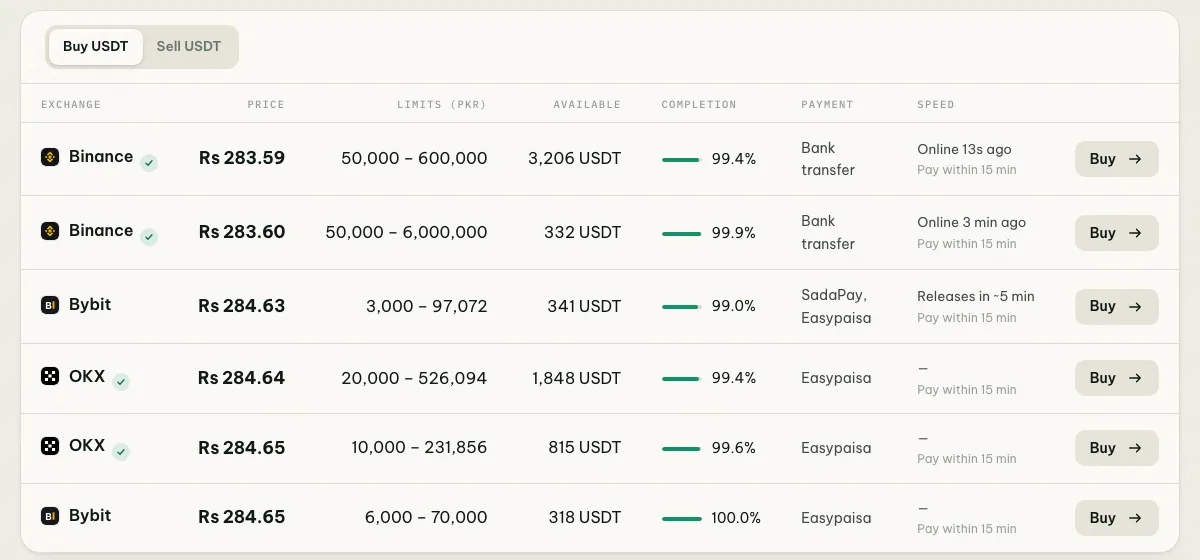
Because Bybit publishes release times, the Speed column in coinglee’s offers table shows them for Bybit offers, so you can compare sellers before you open the app.
Step 3: Place the order and pay
- Open the offer, check the price, limits and payment window, enter the amount and tap Buy.
- Read the advertiser’s terms. Some refuse certain banks or wallets or ask for no transfer remarks. If you can’t follow them, cancel before paying.
- Send the exact amount to the exact account or wallet number shown in the order, from your own account, before the timer ends.
- Tap Payment completed (or similar), only after the money has actually left your account.
Step 4: Receive the USDT
When the advertiser confirms, the USDT arrives in your Funding account. Move it to your Unified Trading account to trade, or withdraw it. See which USDT network to use.
Fees and real costs
Bybit doesn’t currently charge a fee to take an existing P2P offer, so the price is what you pay. Your bank or wallet may charge for the transfer itself. The bigger costs are price gaps between exchanges and methods, and the spread between buying and selling. See the converter.
If the seller doesn’t release
- Send your receipt in the order chat.
- Wait until the payment window ends. Many advertisers release within their average time.
- Tap Appeal, choose the reason and upload your receipt and transaction details.
- Keep your phone nearby. Bybit support may ask for more evidence.
Never cancel an order after you’ve paid. That returns the USDT to the seller.
Bybit compared with Binance and OKX
| Binance P2P | OKX P2P | Bybit P2P | |
|---|---|---|---|
| JazzCash for PKR | No | Yes | Yes |
| Easypaisa, SadaPay, NayaPay | Yes | Yes | Yes |
| Release time shown | Seller’s online time | In merchant profile | Yes, plus payment time |
| Order count | Last 30 days | Lifetime | Last 30 days |
| USDT arrives in | Funding wallet | Funding account | Funding account |
Full comparison: Binance vs OKX vs Bybit P2P in Pakistan.
Common questions
Is Bybit licensed in Pakistan? No exchange holds a full PVARA licence yet, and Bybit hasn’t announced a Pakistani application. See is Binance legal in Pakistan for the licence tracker.
Is a verified advertiser always safe? No badge replaces your own checks: stay in the order, pay from your own account, and never mark paid before paying.
Read also how to trade P2P safely in Pakistan.