How to Sell USDT for PKR Safely on P2P (Binance, OKX, Bybit)
When you sell USDT on P2P, you hold the release button. The buyer sends rupees to your bank account or wallet first; you check it, then release. The exchange holds your USDT in escrow while the order is open, so the buyer can’t take it without your confirmation. That puts you in control, and also makes you the target of most P2P scams. The one rule that matters: release only after the money is actually in your account, in full, from the buyer’s own name.
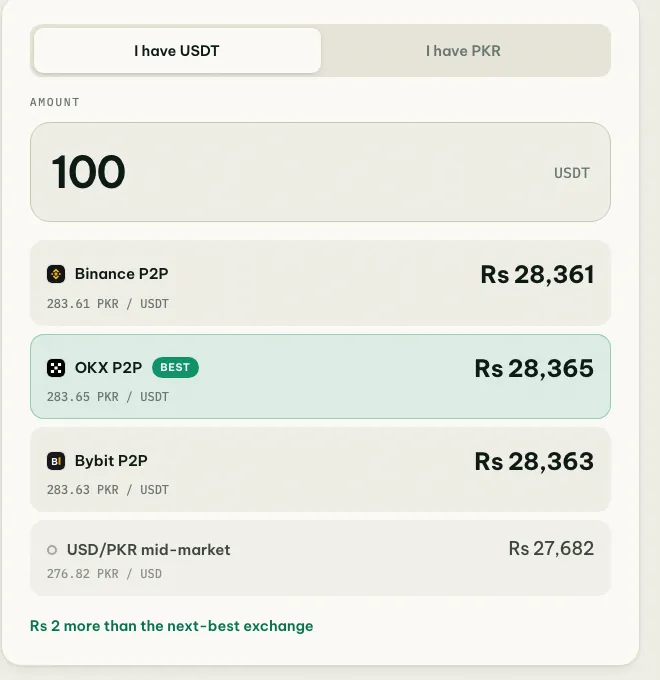
The best selling rate right now is in the “You sell USDT” column of the USDT rate board. To see what your USDT is worth in rupees at each exchange, use the converter.
Before you sell
- Pick the exchange and method with the best selling price. Selling prices differ between exchanges and between bank transfer, Easypaisa and JazzCash.
- Receive into an account in your own name, matching your exchange verification, and add it as a P2P payment method.
- Consider a separate account for P2P. If a buyer’s money turns out to be from a scam, the receiving account can be frozen. Keeping P2P separate protects the account you use for salary and bills.
- Check your wallet’s receiving limits if you’ll be paid by Easypaisa or JazzCash.
- Keep your phone nearby for the whole order.
Step 1: Move USDT to the P2P wallet
USDT for P2P selling must be in the right place: the Funding wallet on Binance, the Funding account on OKX and Bybit. Move it there with an internal transfer first. It’s free and instant.
Step 2: Choose a buyer
Open P2P → Sell → USDT → PKR, enter how much you want to sell and pick how you want to be paid. Prefer buyers who:
- Have 95%+ completion and many orders in the last 30 days.
- Are verified merchants, especially if you’re selling a large amount.
- Have limits that let them pay your whole amount in one transfer.
- Have a short average payment time.
The highest price isn’t always the best. A slightly lower price from an established merchant usually means a faster, cleaner trade.
Step 3: Wait for the payment
Once the order opens, your USDT is locked in escrow. The buyer has a payment window, usually 15 minutes, to pay and mark the order as paid. Don’t release anything in this time, even if the buyer says they’ve “already sent it”.
Step 4: Check the money yourself
When the buyer marks the order as paid:
- Open your own banking app or wallet and check the balance and the incoming transaction. Screenshots, SMS and emails can all be faked. Fake Easypaisa and JazzCash SMS can come from any number.
- Check the amount matches the order exactly.
- Check the sender’s name matches the buyer’s verified name in the order. Raast, IBFT and wallet transfers all show the sender’s name.
- Check it’s one transfer from one account.
If the name doesn’t match, don’t release. Someone may be paying you with a scam victim’s money, and the victim’s complaint will lead to your account. Open an appeal in the order and get official bank or wallet and exchange instructions before any refund. Full details: triangle scams and fake Easypaisa or bank SMS.
Step 5: Release
Once the full amount is in, from the right name, tap Release and confirm with 2FA. The trade is final. There’s no way to recover the USDT after release.
Selling large amounts
- Split into several orders with different established buyers rather than one huge order.
- Prefer bank transfer or Raast for large amounts; wallet limits can stop a big payment.
- Expect questions from your bank. Frequent or large incoming transfers can trigger a review. Keep your P2P order history to explain where the money came from.
What you actually receive
The selling price is per USDT. Calculate amount × price, then account for any applicable order fee, tax or payment charge shown on the actual confirmation. In Pakistan, P2P selling prices usually sit above the interbank dollar rate, which is why many people sell USDT on P2P rather than converting dollars at a bank. See why USDT is more expensive than the dollar rate.
If something goes wrong
| Situation | What to do |
|---|---|
| Buyer marked paid but nothing arrived | Don’t release. Wait a few minutes for IBFT delays, then appeal with your account history |
| Money arrived from a different name | Don’t release. Appeal and obtain instructions before any refund |
| Buyer paid less than the order | Don’t release. Ask them to pay the rest, or refund and cancel through support |
| Buyer pressures you or threatens to report you | Ignore it and appeal. Support decides on evidence |
| Your bank or wallet froze your account | See account frozen after selling USDT |
Don’t
- Release because the buyer is pushing you, or because “the bank is slow”.
- Accept split payments from several accounts or a third party.
- Continue the deal on WhatsApp or Telegram.
More in how to trade P2P safely in Pakistan.