How to Register an OKX Account in Pakistan (CNIC Verification, JazzCash, Referral Code)
OKX is the exchange many Pakistanis open because its P2P market accepts JazzCash, which Binance doesn’t for PKR. Registration takes about 10 minutes and OKX says identity verification is usually reviewed within 24 hours. Choose Pakistan as your region on the very first screen, add the referral code before you finish (it can’t be added later), and verify with your CNIC.
What you need
| Details | |
|---|---|
| Age | 18 or older |
| Email and phone | OKX asks you to verify both; use your own +92 number |
| Identity document | Your CNIC (or a passport or driving licence), valid and not expired |
| Address | Your current residential address; some accounts are also asked for proof |
| Phone with a camera | For the selfie |
| Wallet or bank account in your name | JazzCash, Easypaisa, SadaPay, NayaPay or bank, for P2P later |
Step 1: Choose your country or region
Go to okx.com and tap Sign up, or install the OKX app from Google Play or the App Store. The first screen asks for your Country/region. It’s pre-selected from your internet connection, which can be wrong, especially on a VPN. Select Pakistan if you live in Pakistan.
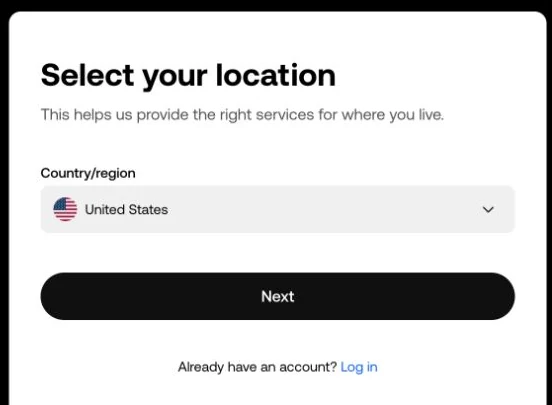
This choice decides which OKX service and terms apply to you, and it has to match the residence you verify later. Choosing another country to “unlock” something leads to a rejected verification or a frozen account.
Step 2: Verify your email and phone
- Enter your email. OKX sends a 6-digit code; enter it within 10 minutes.
- Enter your phone number with +92 selected and tap Verify now. Type the number without the leading 0 (
3XX XXXXXXX), then enter the 6-digit SMS code within 10 minutes.
No code? Check spam, check the number, and wait for the countdown before resending. Use only the latest code.
Step 3: Create a password
OKX asks for a mix of upper- and lower-case letters, numbers and symbols. Use a password you don’t use anywhere else and keep it in a password manager rather than in your gallery or WhatsApp.
Step 4: Enter the referral code before finishing
OKX takes the referral code on the sign-up form, during registration. It can’t be added afterwards. If you came through a referral link, including the button at the end of this guide, check the code is filled in before you continue. A referral code doesn’t change the P2P prices you see.
Step 5: Verify your identity
On the website: profile icon → Verification → Continue under Individual account. In the app: Menu → Account settings → Identity verification.
- Basic information: country of residence (Pakistan), nationality, full name, date of birth, ID number, ID type and residential address. Enter your name exactly as it appears in English on your CNIC.
- ID photos: the original CNIC, front and back, all corners visible, not expired, no glare.
- Selfie: your whole face inside the oval, no mask, glasses or cap, no flash glare.
- Proof of address, if asked: a document showing your current address, issued within the last 3 months, such as a utility bill or bank statement in your name.
OKX says applications are reviewed within 24 hours. Until you’re verified, the account is limited, though withdrawals still work.
Why OKX verification gets rejected
| Problem | What to do |
|---|---|
| Blurry photo, glare, corners cut off | Retake in daylight on a plain surface |
| Expired CNIC | Renew it with NADRA before trying again |
| Name or date of birth doesn’t match the card | Re-enter exactly as printed |
| Region chosen at sign-up isn’t where you live | Contact OKX support; don’t open a second account |
| Address proof older than 3 months, or in someone else’s name | Use a recent bill or statement in your own name |
| Selfie failed | Remove glasses or cap, face the light, use the app |
One person, one account. Using a relative’s CNIC, or buying a “verified account”, gets accounts frozen.
Step 6: Secure the account
Before you put money in, open Security in your account settings and turn on:
- Authenticator app (Google Authenticator or similar). Save the backup key offline and never share it or screenshot it into chats.
- Anti-phishing code, so you can tell real OKX emails from fakes.
- Withdrawal address whitelist (optional), so USDT can only go to addresses you’ve saved.
Step 7: Get ready for P2P
OKX P2P needs a verified email and phone plus completed identity verification. Then add your payment methods in P2P. coinglee tracks OKX’s PKR offers for JazzCash, Easypaisa, SadaPay and NayaPay. The account name on each must match your verified OKX name.
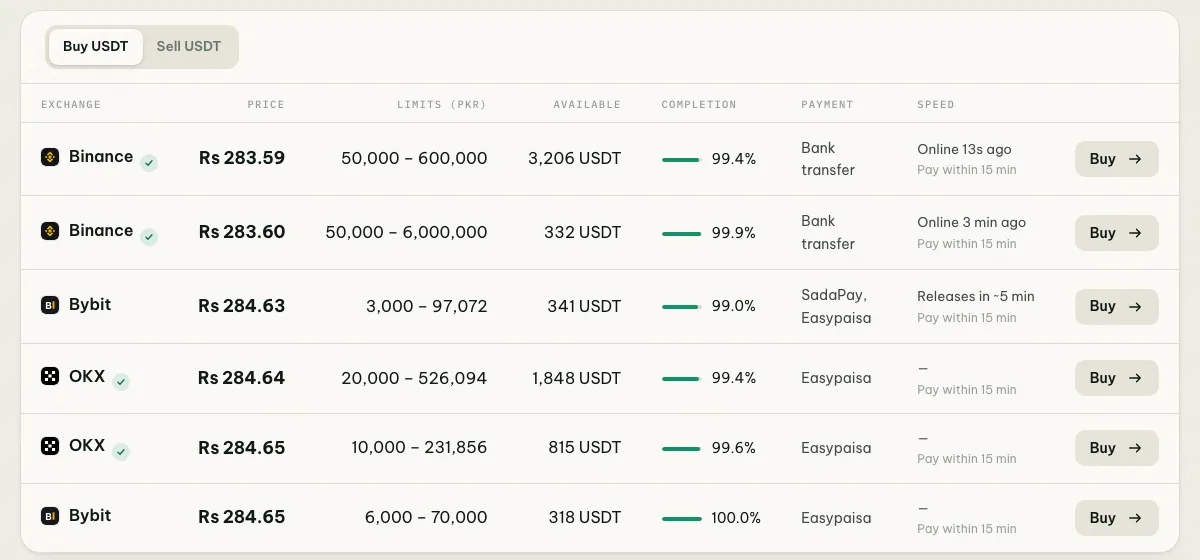
JazzCash offers often cost about a rupee more per USDT than other methods because fewer sellers accept it. Compare USDT prices via JazzCash with Easypaisa before choosing.
Is OKX allowed in Pakistan?
Buying crypto isn’t an offence for individuals in Pakistan. PVARA licenses providers under the Virtual Assets Act 2026; OKX was reported to be applying, and an application isn’t a licence. Check PVARA and the licence tracker in is Binance legal in Pakistan.
Common questions
Can I add a referral code later? No. OKX takes it only during registration.
Do I need proof of address? Only if OKX asks for it during verification. If it does, use a document from the last 3 months in your name.
Can I use JazzCash on OKX? Yes. OKX P2P has PKR offers that accept JazzCash; Binance doesn’t.
Next steps
Check today’s USDT rate in Pakistan, then follow how to buy USDT with JazzCash on OKX. Read P2P safety in Pakistan before your first order.
Steps checked against OKX’s help pages on registration and identity verification on 4 October 2026. Screens can change; follow what your app shows.
How to open a OKX P2P account
Referral link: coinglee may earn a commission from the exchange. Your price doesn't change.
Crypto-assets are volatile and you can lose money. No exchange holds a full PVARA licence yet; trade only what you can afford to lose.