How to Buy USDT on Binance P2P with VND (Step by Step)
Legal notice: since 1 September 2026, under Decree 284/2026/ND-CP, individuals in Vietnam who trade crypto-assets other than through a provider licensed by the Ministry of Finance can be fined 30–50 million dong. Binance, OKX and Bybit are not licensed in Vietnam. coinglee provides price information for reference only.
Need to finish setting up your account? Read the Binance registration and security guide. Complete registration and security guide →
Binance P2P is a marketplace where people trade USDT with each other directly. You never deposit dong into Binance. Instead you pay a seller by bank transfer or e-wallet, and Binance holds the seller’s USDT in escrow until the seller confirms your money arrived. Done carefully, a first purchase takes 15–30 minutes. This guide covers each step, the checks that matter, and what to do if something goes wrong.
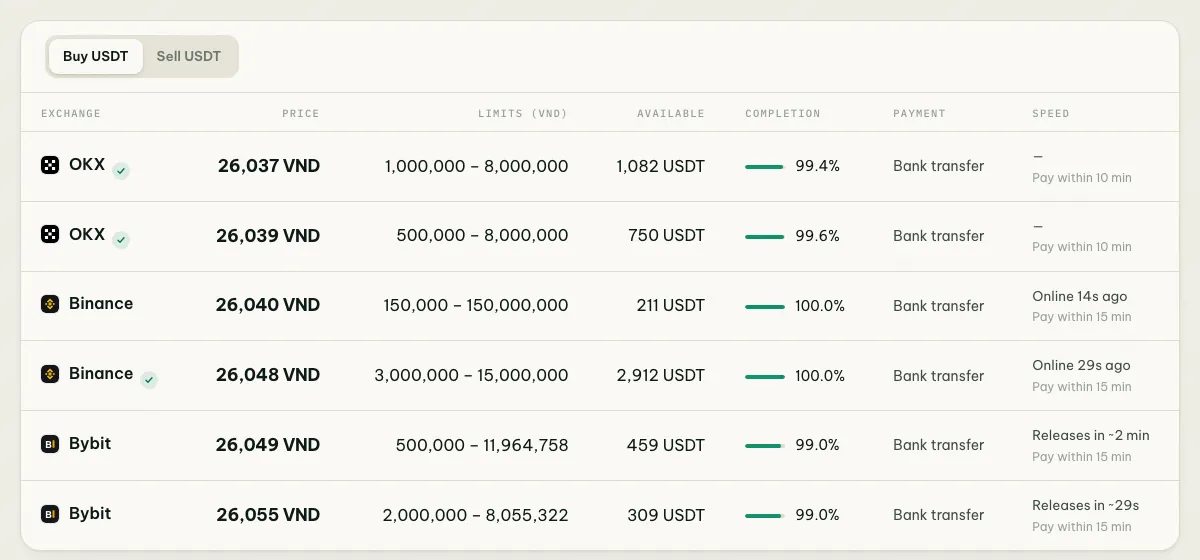
Before you buy, check today’s USDT price to see which exchange is cheapest right now. The gap is often a few dozen dong per USDT, which adds up on larger amounts.
Before you start: account and bank setup
1. A verified Binance account. P2P needs identity verification (KYC). In Vietnam this means a photo of your chip-based citizen ID (CCCD) or passport and a face scan. Approval usually takes minutes, sometimes a day.
2. Two-factor authentication. Turn on an authenticator app or passkey. You’ll need it to confirm orders and withdrawals.
3. A bank account or e-wallet in your own name. The name on the account you pay from must match your verified name on Binance. Sellers check this and can refuse or refund payments from a different name, because third-party payments are how most P2P fraud works.
4. Bank transfers that actually go through. Since 1 July 2024, Vietnamese banks require face authentication for online transfers over 10 million dong per transaction or over 20 million dong per day. Since 2025, accounts whose biometrics don’t match the chip ID can’t transfer online at all. Do this once in your banking app before you need it, not during a 15-minute payment window.
5. Add your payment methods under P2P → Payment methods in the Binance app: your bank account, MoMo, ZaloPay or Viettel Money.
Step 1: Open P2P and filter the offers
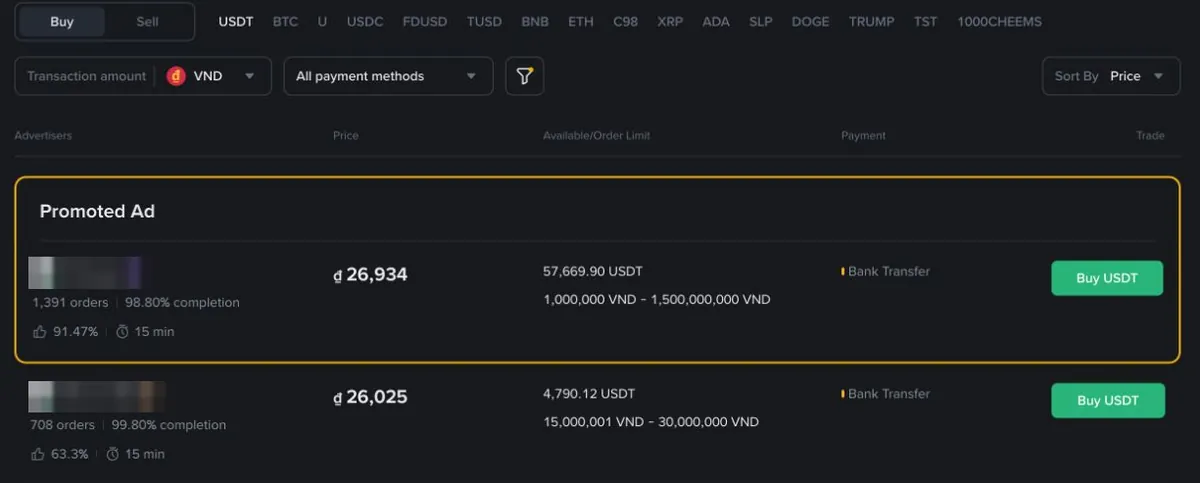
In the Binance app, tap P2P (or Trade → P2P), choose Buy, then USDT and VND.
- Enter the amount you want to spend, for example 5,000,000 VND. Offers that can’t take that amount disappear, which removes most of the bait.
- Filter by payment method: bank transfer, MoMo, ZaloPay, Viettel Money and so on.
- Optionally show verified merchants only. They usually have deeper liquidity and faster release.
Step 2: Read the offer card
Every offer shows the same fields. Here’s what to look for:
| Field | What it means | What to look for |
|---|---|---|
| Price | Dong per 1 USDT | Low, but not far below everyone else |
| Limit | Smallest and largest order this seller accepts | Covers your amount |
| Available | USDT the seller has left | More than you need |
| 30d orders / completion | Trades in the last 30 days and the share completed | coinglee only counts advertisers with 50+ orders and 95%+ completion |
| Avg. release time | How fast the seller usually releases after you pay | A few minutes |
| Payment window | Time you have to pay after opening the order | Usually 15 minutes |
Offers with an eye-catching price often allow only a few hundred thousand dong per trade, or have a very high minimum. That’s why the reference price coinglee shows uses offers that can handle a normal trade of about 5 million VND.
Step 3: Place the order
Tap Buy on the offer, type the amount in dong or USDT and check the USDT you’ll receive. Then confirm. The order screen opens with a countdown timer and the seller’s payment details.
Read the seller’s terms in the order before paying. Some ask for a specific transfer note, such as the order number, or no note at all. Some refuse certain banks. If the terms don’t suit you, cancel now, before paying. Cancelling before you’ve paid costs nothing, but cancelling too many orders in a day can temporarily stop you from using P2P.
Step 4: Pay exactly what the order says
- Open your banking app or e-wallet and pay the exact amount to the account shown in the order. Copy the account number from the order screen rather than typing it.
- Use the note the seller asked for in the order terms.
- Go back to Binance and tap Transferred, notify seller. Only tap it after the money has actually left your account. Marking an order as paid when you haven’t is treated as fraud.
Never pay to an account sent in chat that’s different from the order, and never split the payment across several transfers unless the seller asks for it in the order.
Step 5: Receive the USDT
The seller checks their account and releases the USDT, usually within a few minutes. It arrives in your Funding wallet. From there you can move it to Spot, keep it, or withdraw it to another wallet. For withdrawals, see which USDT network to use.
What a purchase really costs
Check the current Binance P2P fee schedule and the order confirmation. Taker fees can depend on the fiat market and account, so the quoted price is not necessarily the total cost. Add any applicable fee, payment charge and withdrawal cost separately. The hidden cost is the spread: buying and selling prices differ by a few dozen dong per USDT. For example, if you buy 1,000 USDT at 26,050 and the best selling price is 26,000, turning it straight back into dong would cost about 50,000 dong. Check the live spread on the converter.
If something goes wrong
| Problem | What to do |
|---|---|
| You paid but the seller hasn’t released | Message them in the order chat with your receipt. If the timer runs out, tap Appeal and upload the receipt. Binance support decides based on evidence |
| You paid the wrong amount | Tell the seller in the chat. They can refund the difference, or you can agree on a new order. Don’t release a second payment until it’s settled |
| The timer ran out before you paid | The order cancels itself. Open a new one; don’t pay into an expired order |
| You paid but forgot to tap “Transferred” | Don’t open a new order. Contact the seller in the chat and appeal if needed |
| Seller asks you to cancel after you paid | Never cancel after paying. Cancelling tells Binance you didn’t pay and returns the USDT to the seller |
Common questions
Is the cheapest offer always the best? No. Check limits, completion and release time. A slightly higher price from an established merchant is often the better deal.
Can I pay from my spouse’s or company’s account? No. The payer’s name must match your verified name.
Why does the seller want me to stay in the order chat? That’s correct. Anyone who asks to move to Zalo, Telegram or a “better price outside Binance” should be treated as a scammer.
Legal note
Since 1 September 2026, individuals in Vietnam who trade crypto-assets other than through a provider licensed by the Ministry of Finance can be fined 30–50 million dong (Decree 284/2026/ND-CP). Binance isn’t licensed in Vietnam. See Vietnam crypto regulation 2026.
Read also how to trade P2P safely to avoid frozen bank accounts from dirty money.
A promoted offer is not automatically the cheapest usable offer