How to Buy USDT on OKX P2P with VND (Step by Step)
Legal notice: since 1 September 2026, under Decree 284/2026/ND-CP, individuals in Vietnam who trade crypto-assets other than through a provider licensed by the Ministry of Finance can be fined 30–50 million dong. Binance, OKX and Bybit are not licensed in Vietnam. coinglee provides price information for reference only.
Need to finish setting up your account? Read the OKX registration and security guide. Complete registration and security guide →
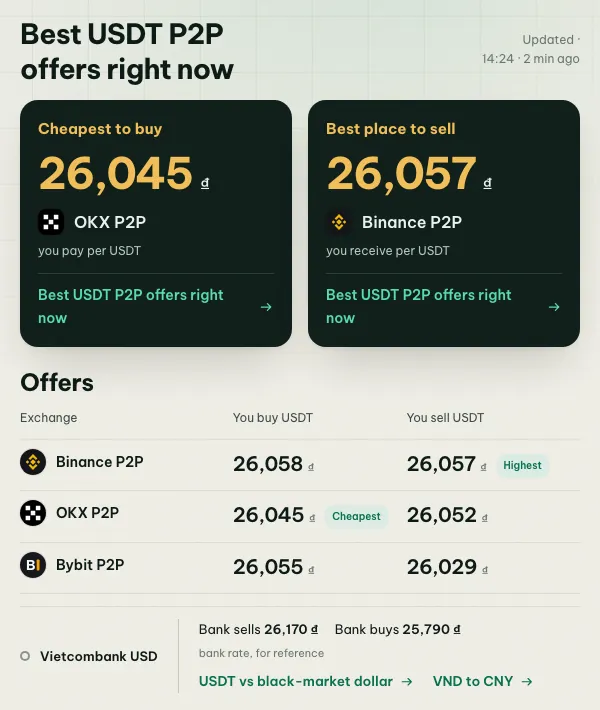
OKX P2P works on the same principle as Binance P2P: OKX holds the seller’s USDT in escrow, you pay the seller directly by bank transfer or e-wallet, the seller confirms, and the USDT is released to your account. Over the past months OKX has often had the cheapest USDT buying price in Vietnam, so it’s worth knowing even if you already use Binance.
Prices move all day. Check the live USDT board or the OKX P2P page to see whether OKX is cheaper than Binance and Bybit right now.
Express or P2P?
When you open Buy crypto in the OKX app you’ll see two ways to buy with VND:
| Express | P2P | |
|---|---|---|
| How it works | OKX picks an offer for you | You choose the seller yourself |
| Control over price and seller | Low | Full |
| Best for | Small, quick purchases | Better prices, larger amounts |
Express is still P2P underneath: you pay a seller by transfer. This guide uses P2P mode, because it lets you check the seller before paying.
Before you start
- Verify your identity in OKX with your chip ID card (CCCD) or passport and a face scan.
- Turn on 2FA (authenticator app or passkey) and set a fund password if asked. OKX uses it to confirm P2P actions.
- Add a payment method in your own name under P2P → Payment methods: bank account, MoMo, ZaloPay or Viettel Money. The name must match your verified name.
- Make sure your bank allows the transfer. Online transfers over 10 million dong per transaction, or 20 million per day, need face authentication in your banking app.
Step 1: Find offers
Open P2P trading, choose Buy, USDT and VND. Then:
- Type the amount you want to spend. OKX hides offers whose limits don’t fit, which removes most of the bait.
- Filter by payment method.
- Sort by price, but read the merchant details before choosing.
Step 2: Read the merchant details
OKX labels established sellers with merchant badges, such as certified or diamond merchants. A badge means the seller passed extra checks and posted a deposit. It’s a good sign, but check the numbers too:
- Completion rate: coinglee only counts offers at 95% or above.
- Completed orders: OKX shows a lifetime count, so a high number may include old activity. Look at the 30-day figures in the merchant profile too.
- Limits: some of the best-priced offers have minimums of tens of millions of dong.
- Payment window: usually 15 minutes.
- Terms: read the seller’s notes. Some refuse certain banks or ask for a specific transfer note.
Step 3: Order, pay, confirm
- Open the offer, enter the amount, check the price and the USDT you’ll get, and place the order.
- The order shows the seller’s account and a countdown. Pay the exact amount to the exact account shown, from your own account.
- Tap I have paid. Only tap it after the money has actually left your account.
- When the seller confirms, the USDT arrives in your Funding account. Transfer it to your trading account if you want to trade it, or withdraw it. See which USDT network to use.
What it costs
OKX doesn’t currently charge a fee to take an existing P2P offer, so the price is the cost. The difference between the best buying and selling prices, the spread, is the real cost of a round trip. The converter shows what an amount is worth at today’s best prices.
OKX compared with Binance and Bybit
| Binance P2P | OKX P2P | Bybit P2P | |
|---|---|---|---|
| Where USDT arrives | Funding wallet | Funding account | Funding account |
| Order count shown | Last 30 days | Lifetime (30-day in profile) | Last 30 days |
| Release time shown | Yes | In merchant profile | Yes |
| Quick-buy mode | Express | Express | One-click buy |
Which one is cheapest changes from hour to hour. The comparison page shows which exchange was cheapest over the last 7 and 30 days.
When things go wrong
- You paid, but the seller hasn’t released: message them in the order chat with your transfer receipt. If the payment window ends without a release, open an appeal in the order and upload the receipt.
- Never cancel after paying. Cancelling tells OKX you didn’t pay and returns the USDT to the seller.
- Too many cancellations in a day can temporarily stop you from placing P2P orders.
- Never trade off-platform. A seller who asks you to continue on Zalo or Telegram, or to pay a different account “for a better price”, is a scammer.
Common questions
Is OKX P2P safe? Escrow protects you as long as you stay inside the order, pay from your own account and don’t release or cancel early. Most losses come from leaving the platform.
Why was my payment refunded? Usually because the name on your bank account didn’t match your verified name, or you paid the wrong amount.
Legal note
Since 1 September 2026, trading crypto-assets in Vietnam other than through a provider licensed by the Ministry of Finance can be fined 30–50 million dong (Decree 284/2026/ND-CP). OKX isn’t licensed in Vietnam. See Vietnam crypto regulation 2026.
More on avoiding scams: how to trade P2P safely.